1. Introduction
For holiday let agencies, serviced accommodation operators, and short-term rental property managers across the UK, keeping property owners informed of reservation updates is a significant part of daily operations. However, manually texting or emailing landlords every time a check-in is scheduled or a booking changes is time-consuming and prone to human error.
To address this challenge, many professional property managers turn to read-only iCal export links generated by online travel agencies (OTAs) like Airbnb, Booking.com, and Vrbo. Integrating scheduled iCal sync software allows agencies to aggregate calendar data seamlessly. However, while calendar synchronization simplifies communications, it also presents unique operational challenges that managers must navigate. This comprehensive guide covers the most common iCal sync problems rental agencies face and practical solutions to address them.
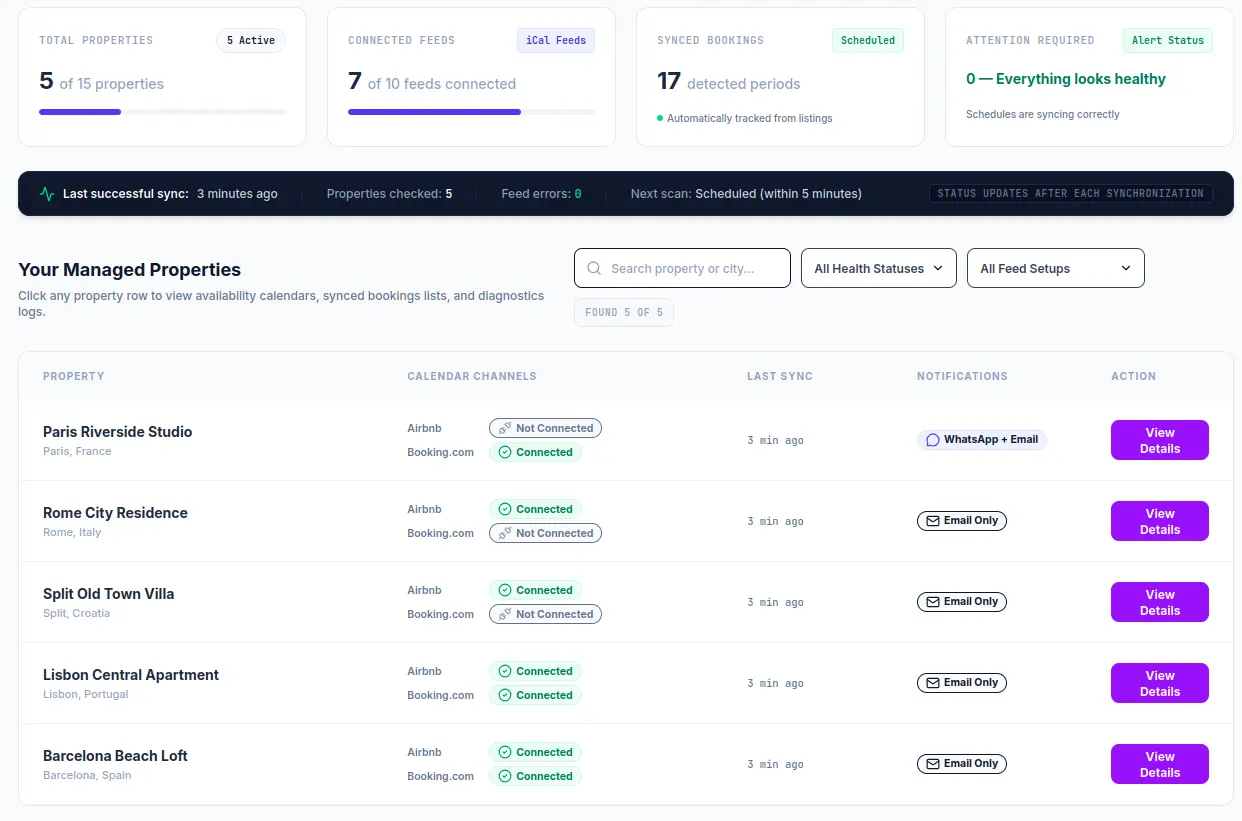
OwnerPing helps rental agencies monitor connected iCal feeds and keep booking change workflows organised.
2. Why rental agencies rely on iCal feeds
The primary reason UK holiday let agencies rely on iCal links is simplicity. Standard read-only calendar export links are universally compatible and extremely easy to set up. Unlike custom API integrations, which require deep technical expertise, developer registration keys, and costly ongoing maintenance, an iCal feed can be established in seconds. You simply copy a read-only .ics URL from the platform extranet and paste it into your tracking platform.
Furthermore, using public-facing, read-only iCal links is secure. Because these feeds do not require sharing account passwords, developer tokens, or full admin permissions, agencies can monitor calendar timelines without exposing sensitive booking details or credit card information. To explore how the UK holiday let market uses these links to improve landlord relations, refer to our UK rental agency iCal sync overview.
3. Problem 1: iCal feeds do not update instantly
One of the most persistent misunderstandings among rental property owners is that iCal feeds work in "real-time." iCal is fundamentally a pull-based, file-retrieval protocol. When a guest reserves a holiday home on Airbnb, the platform writes this event to a file hosted on its servers. The file remains static until the platform's cache re-compiles, which typically happens on a scheduled periodic cycle of a few hours.
Consequently, when your monitoring software periodically checks the connected iCal feeds, it can only pull the latest generated version of that file. This means there is always a latency window between when a guest completes a booking and when it is displayed in the feed.
The Solution: Set clear expectations with property owners. Inform them that the system checks connected iCal links on a scheduled sync frequency. Clearly state that the feeds are intended for client-communication, arrival alerts, and team scheduling—not for instant direct-write double-booking prevention.
4. Problem 2: different platforms refresh calendars at different speeds
Each travel platform uses its own caching and file-generation algorithms, meaning Airbnb, Booking.com, and Vrbo write calendar modifications at different speeds. For example, Airbnb might re-generate its export links every few hours, while Booking.com may update its links on a completely different timetable.
If your agency is attempting to reconcile calendar changes across multiple properties, these discrepancies can cause temporary alignment errors. For instance, a booking completed on Booking.com might show up on your master list before the corresponding date block appears on Vrbo.
The Solution: Use a dedicated tool that runs a scheduled sync on a predictable timetable to periodically pull all connected feeds simultaneously. This normalizes the data retrieval process, making sure that your team and property owners receive balanced, well-organised updates.
5. Problem 3: cancelled bookings can be hard to track manually
When a guest cancels a booking, standard travel platforms handle the iCal representation in a very silent manner: they simply delete the corresponding event block from the public file. There is no explicit "CANCEL" event inside the feed; the date range merely becomes open space again.
If you are parsing calendar feeds manually or using lightweight widgets that don't maintain historical logs, your system will not realise a booking was cancelled. It will simply look like a normal open date. This leads to "ghost bookings," where landowners expect guest arrivals for reservations that have actually been terminated.
The Solution: To track cancellations, your tracking database must keep a complete history of previously imported booking UIDs. When a scheduled pull occurs, the software must compare the active UIDs in the new feed with the existing log. Any previously recorded UID that is now missing from the feed indicates a cancellation, which can trigger an automated update to the owner. To understand this pattern in depth, check out our guide on booking cancellation notifications for property owners.
6. Problem 4: duplicate calendar feeds can create confusion
A classic issue in short-term rental management is the "circular sync trap." This happens when an agency imports an Airbnb iCal link into Booking.com, and then imports that same Booking.com link back into Airbnb. While this helps cross-block calendars, it can cause export feeds to include duplicate data.
When scheduled software checks these links, it may detect identical reservation blocks multiple times across different feeds, causing confusion. The system might misinterpret a single guest stay as several distinct bookings and dispatch duplicate notifications to the landlord.
The Solution: Always extract "clean," raw export links from each individual OTA extranet instead of using aggregate feeds. Make sure that your tracking system is configured to deduplicate bookings by analyzing matching dates, or handle each portal feed separately to keep the monitoring accurate. For detailed steps on setting up clean platform connections, read our specialized pieces on Booking.com iCal export guides and Airbnb iCal sync guide.
7. Problem 5: blocked dates and reservations can look similar
When a property owner logs into Airbnb or Vrbo to block out dates for maintenance, personal holidays, or deep cleaning, these administrative blocks look identical to genuine guest reservations in the raw iCal file. The file typically designates both as "Blocked" or "Reserved," without providing guest names, rental amounts, or block notes.
This lack of metadata makes it difficult to determine whether a block represents an actual guest arrival or an administrative freeze. If your agency triggers notifications for every new block detected, landowners might receive confusing notifications about stays they blocked themselves.
The Solution: Introduce filter options in your agency workflow. Work with a platform that allows you to specify whether certain connected feeds should trigger notifications, or configure custom arrival windows so that only blocks fitting reservation criteria are highlighted for owner updates.
8. Problem 6: first sync should not trigger owner notifications
When you first connect an iCal link for a newly acquired holiday let, the calendar file contains the entire historical list of active future reservations. If your monitoring software immediately starts processing these blocks as "newly discovered" entries, it will trigger a massive wave of false landlord notifications.
Receiving dozens of text messages and emails for long-established bookings can severely damage an agency's professional reputation and create unnecessary panic for owners.
The Solution: The first synchronization must always be treated as a silent baseline. During initial onboarding, the tracking database must record and import all active blocks quietly, without dispatching any notifications. Only subsequent sync events—where a genuine new booking or cancellation is detected relative to that baseline—should trigger notifications.
9. Problem 7: owners may not see platform alerts
While OTAs send automated notifications to the account owner, rental agencies often manage listings through a centralized corporate account. This means property owners don't have access to the direct notifications, guest messages, or platform-specific alerts.
If your agency relies solely on landlords checking online spreadsheets or portal dashboards, updates will inevitably be missed. Landlords who are busy, traveling, or managing other businesses expect straightforward, mobile-friendly updates without having to log into a client portal.
The Solution: Forward booking updates directly to landowners using standard, reliable channels like email and WhatsApp. For managing Vrbo listings specifically, you can review our specialized Vrbo iCal sync guide for a cohesive multi-channel strategy.
10. How scheduled monitoring helps agencies stay organised
Using a dedicated scheduled monitoring platform solves these iCal sync challenges. Instead of manually inspecting calendars, a scheduled system periodically checks connected iCal feeds from Airbnb, Booking.com, and Vrbo, parses the dates, and updates a central dashboard.
This approach gives UK agencies a single, organized overview of all check-ins, departures, and active booking statuses, eliminating the need to coordinate data across multiple travel portals.
11. How OwnerPing supports email and WhatsApp owner updates
OwnerPing is built specifically for UK holiday let agencies, serviced accommodation operators, and short-term rental property managers who want to automate owner updates.
By connecting raw, read-only iCal export links from Airbnb, Booking.com, and Vrbo, OwnerPing periodically tracks calendar events on a scheduled sync frequency. When a new reservation or cancellation is detected, the platform can notify property owners via email or WhatsApp when configured. This helps agencies eliminate manual messaging, reduce operational errors, and deliver a premium client experience.
12. Best practices for rental agencies using iCal feeds
To get the most out of iCal feeds, rental agencies should follow these industry best practices:
- Always Export Direct Links: Avoid using aggregated feeds. Copy the raw, direct iCal export URL from each platform's extranet.
- Establish baseline syncs: Ensure your monitoring tool completes a quiet initial baseline sync so existing bookings don't trigger massive notification spikes for landlords.
- Set Clear Landlord Expectations: Educate property owners on scheduled sync frequencies, explaining that feeds are pulled on a periodic cycle and not in real-time.
- Verify Timezone Settings: Confirm that the timezone configured in your monitoring software matches your properties' local UK timezones to ensure accurate check-in and check-out dates.
- Use Multi-Channel Updates: Give landlords the option to receive alerts via email, WhatsApp, or both to ensure high visibility.
13. FAQ Section
Why do iCal feeds not update instantly?
iCal is fundamentally a pull-based, read-only system. Platforms like Airbnb, Booking.com, and Vrbo write export data to a static file on their servers and cache it. These caches are updated on a periodic, scheduled frequency rather than instant real-time. Clients retrieving this file are viewing cached data that may have been generated several hours prior.
Can iCal sync prevent all double bookings?
No. iCal sync cannot guarantee double-booking prevention. Because iCal links do not synchronize instantly and are read-only feed pulls, there is always a latency window of up to several hours where two bookings can overlap on different channels before a sync is executed. To prevent double-bookings, agencies must use a direct-write API channel manager, though they may still use scheduled iCal checks in parallel for owner communication workflows.
Can iCal feeds show cancellations?
Yes. When a booking is cancelled on Airbnb, Booking.com, or Vrbo, the block associated with that booking is completely removed from the public export file. By comparing the list of active UIDs in the current feed with historical records stored in a database, a monitoring system can detect that a previously active booking is now missing, and flag it as cancelled.
Why should the first sync be treated as a baseline?
When you first connect an iCal feed, all existing reservations are loaded for the first time. If the system does not establish these bookings as a quiet baseline, the engine would interpret dozens of pre-existing, older bookings as brand-new entries and trigger a massive wave of false landlord notifications.
Can blocked dates look like reservations?
Yes. In standard iCal exports, admin blockouts, owner personal stays, and guest bookings often appear as identical calendar event blocks. Distinguishing between them requires structured check-in window logic or manual filtering, as standard feeds generally do not provide rich metadata to identify block reasons.
Do I need Airbnb, Booking.com, or Vrbo passwords?
No. Scheduled iCal monitoring uses public-facing, read-only export links that you copy from each portal's extranet. It does not require any passwords, developer keys, or direct-write account access, keeping your credentials entirely secure.
Can owners receive WhatsApp updates?
Yes. When configured, systems like OwnerPing can translate detected booking changes (new reservations or cancellations) into short, clear updates sent to the property owner's WhatsApp number or email address automatically.
Is scheduled iCal monitoring useful for UK rental agencies?
Yes, absolutely. For UK holiday let managers and serviced accommodation operators, scheduled iCal checks offer an elegant, lightweight solution to keep landlords updated on booking movements without the expense of complex API structures or manual text messages.
14. Conclusion
Understanding common iCal sync issues and applying standard best practices allows UK rental agencies to build robust owner communication workflows. By utilizing scheduled iCal monitoring and clear notifications, you can eliminate manual updates and improve client satisfaction.
OwnerPing offers a secure, simple platform for tracking connected Airbnb, Booking.com, and Vrbo feeds and updating property owners. Learn more about our plans on our Pricing page, or get in touch via our Contact page to start your 14-day trial.
Related guide: Learn about booking cancellation notifications for property owners.